
The Microsoft SharePoint and FuseSign integration is now live, giving accounting firms an easier way to move documents from storage to signature and back again.
For firms already using the Microsoft Suite, connecting SharePoint with FuseSign helps remove the manual steps that would typically sit between managing a document and sending it for signature.
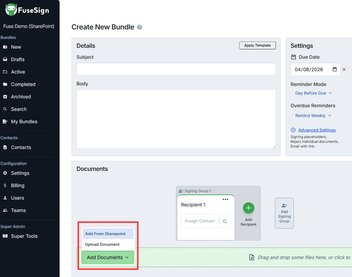
FuseSign users can now select documents directly from SharePoint when creating a signing bundle, rather than downloading them and uploading them into FuseSign separately.
Once signing is complete, the signed file is automatically saved back into the same SharePoint folder as the original. This creates a connected document loop from SharePoint to FuseSign, through signature, and back into SharePoint.
For connection steps, required permissions, and an in depth guide on using the integration visit the SharePoint integration knowledge base guide.